

There are about as many approaches to web design as there are trees in the jungle. Functional web design is one of them, and while it may not always be the flashiest option in the bunch, it focuses on something every website needs to do: work.
You can choose bold colours, creative layouts, impressive animations, or a clean, minimalist style.
But no matter how your website looks, visitors still need to be able to find what they’re looking for, understand what you offer, and complete the task that brought them there.
Because a beautiful website isn’t very useful if no one knows where to click next.
That’s the purpose of functional web design: bringing appearance, usability, and purpose together to create a website that looks good and makes life easier for the people using it.
What Is Functional Web Design?
Functional web design is all about designing a website around the needs, goals, and tasks of the people using it.
It makes designers think about how visitors find information, move between pages, understand content, complete forms, use interactive features, and take the next step.
Years ago, web experience expert Gerry McGovern described this idea as the “functional heart” of web design. His argument was simple: information must be findable, and once people find it, they need to be able to do something useful with it.
That might mean:
- Applying to a university program
- Registering for an event
- Finding a service
- Making a donation
- Downloading a report
- Requesting a consultation
- Paying a bill
- Contacting the right department
The exact task will change from one website to another. Functional design makes sure the website supports that task without creating unnecessary confusion or frustration.
Functional Doesn’t Have to Mean Boring
When people hear “functional design,” they sometimes picture a plain website without personality, creativity, or visual interest.
That isn’t the goal.
A functional website can still use strong branding, bold imagery, interactive features, animation, and creative layouts. Those elements simply need to support the experience instead of getting in its way.
The real goal is balance.
Your visual design should help people understand what matters, recognize where they are, and decide what to do next. It shouldn’t make them solve a puzzle before they can find your services or fill out a form.
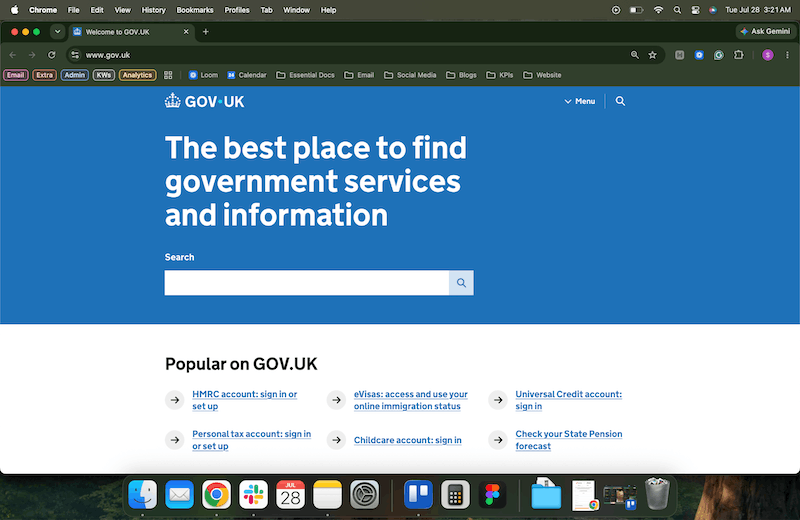
A useful example is Gov.uk. The website became the first nonphysical project to win the Design Museum’s Design of the Year award in 2013. It wasn’t recognized for flashy graphics. It was recognized for the clarity of its thinking and its ability to help millions of people complete everyday tasks.
That same approach still guides the UK government’s digital design principles today: start with user needs, do the hard work required to make things simple, and remove unnecessary complexity.
Your website doesn’t need to look like Gov.uk, but it can learn from the thinking behind it.
What Makes a Website Functional?
Functional web design involves more than choosing a clear menu or adding a noticeable button. It brings together several parts of the website experience.
1. It Starts With Real User Needs
Organizations usually build websites around their internal structure.
The navigation follows departments. Service names use internal language. Content gets divided according to which team owns it.
That might make sense to the people inside your organization, but your visitors won’t likely understand any of it.
They arrive with questions such as:
- Can you help with my problem?
- Which program should I apply to?
- How much does this cost?
- Am I eligible?
- Where can I find the report?
- Who should I contact?
- What happens after I submit this form?
Functional design starts with these questions instead of beginning with the organization’s internal structure.
Instead of asking, “How should we organize our departments?” you ask, “What are people trying to find or do?”
That small shift can completely change how your website is structured.
2. Information Is Easy to Find
Visitors shouldn’t need a map, a compass, and a full understanding of your organizational chart to find a page.
Your navigation, search, headings, links, and page names should all use language people recognize.
That might mean replacing an internal department name with something clearer, grouping related services together, adding filters to a resource library, or removing menu items that lead to nearly identical pages.
Good navigation gives people a clear sense of where they are and where they can go next.

3. Every Page Has a Clear Purpose
A functional page quickly answers three questions:
- What is this page about?
- Is it relevant to me?
- What should I do next?
That sounds straightforward, but plenty of pages don’t do it.
Some begin with several paragraphs of background information before explaining the actual service. Others include five different calls to action that all compete for attention. Some end without giving the visitor anywhere useful to go.
A clear web page doesn’t have to be short, but it should be focused.
4. The Experience Is Predictable
People bring expectations from other websites with them.
They expect the logo to take them home, a button to look clickable, or links that look the same to behave the same way. They expect forms to explain what went wrong when they make an error.
Functional design works with those expectations instead of fighting against them.
You can still be creative, but visitors shouldn’t have to relearn how websites work every time they land on a new page.
5. It Works for People With Different Abilities
Accessibility isn’t separate from functionality. In fact, it’s a major part of functionality.
A website isn’t fully functional if someone can see a button but can’t reach it with a keyboard. A form isn’t functional if a screen reader can’t understand the labels. A video isn’t fully useful if someone can’t access captions or a transcript.
Accessible design considers things like:
- Keyboard navigation
- Colour contrast
- Clear form labels
- Descriptive link text
- Alternative text for meaningful images
- Visible focus indicators
- Logical heading structures
- Captions and transcripts
- Text resizing
- Predictable interactions
These improvements don’t only help people with disabilities. They often make the website easier for everyone to use.
Learn more about what actually makes a website accessible.
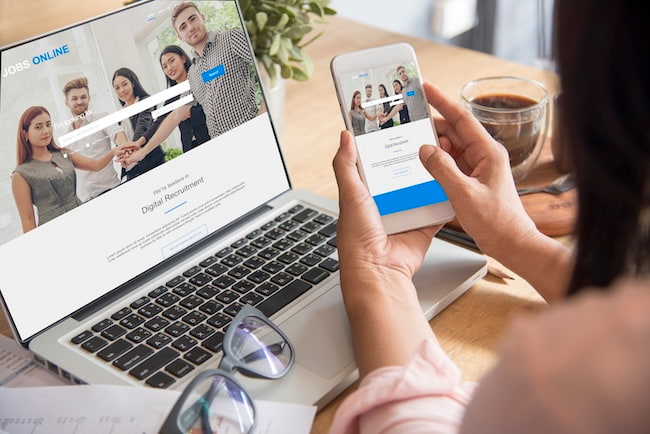
6. It Performs Well on Different Devices
That beautifully designed homepage isn’t doing much good when it takes forever to load, shifts around as someone tries to click, or becomes almost impossible to use on a phone.
Responsive design isn’t just about shrinking everything until it fits.
It means thinking about how the experience changes on a smaller screen.
What should visitors see first? Are buttons easy to tap? Does the navigation still make sense? Can someone complete a form without constantly zooming in and out?
Your mobile visitors are trying to complete the same tasks as everyone else. Your website should make that possible.
7. Forms and Features Actually Work
Forms are often where your most valuable website actions happen.
They’re also where visitors experience some of the most frustrating problems.
A functional form should make it clear:
- Which information is required
- How information should be formatted
- Why you’re asking for certain details
- What went wrong when there’s an error
- Whether the form was submitted successfully
- What will happen next
Long, confusing forms can cause people to give up, especially when they’re asked for information that doesn’t seem necessary.
Before adding another field, ask whether you truly need it.
Your sales or marketing team may love collecting extra details, but that information isn’t very useful if no one finishes the form.
8. It Works for Your Internal Team, Too
Your visitors aren’t the only people who need to use your website.
Your internal team needs to be able to update content, publish new pages, manage resources, and keep information current.
A website may look polished on the outside while creating complete chaos behind the scenes.
If every small update requires developer support, editors avoid making changes, or pages constantly break when someone adds content, the website has a functionality problem.
The right CMS can make a major difference.
Signs Your Website Looks Better Than It Works
You may have a functional design problem if:
- Visitors regularly ask where to find basic information
- Your team receives questions the website should already answer
- Important pages are buried several levels deep
- Navigation labels rely on internal terminology
- People abandon important forms
- Search results are confusing or inaccurate
- Pages have several competing calls to action
- The mobile experience feels awkward
- Editors struggle to make routine updates
- Duplicate or outdated content keeps piling up
- Your website receives traffic but very few meaningful actions
None of these signs automatically mean you need a complete redesign. Sometimes a few focused improvements can make a major difference.
The important thing is understanding where people are getting stuck and why.
How to Make Your Website More Functional
Improving functionality doesn’t always mean starting over. You can begin by focusing on the parts of the website that matter most.
Identify Your Visitors’ Main Tasks
Start by listing the most important things people come to your website to do. Then compare that list with what your homepage, navigation, and key landing pages emphasize.
Do they match? Once you know the main tasks, you can design clearer pathways around them.
Test Real User Journeys
Choose a few realistic tasks and try to complete them yourself.
For example:
- Find a specific service
- Register for an event
- Locate a policy
- Apply to a program
- Contact the right team
- Make a donation
- Download a report
Try each task on desktop and mobile.
Better yet, ask someone who wasn’t involved in building the website to try. Watch where they pause, backtrack, miss a link, or misunderstand the instructions.
You may be surprised by what feels obvious to your team but isn’t obvious to anyone else.
Remove What Gets in the Way
More content doesn’t always make a website more helpful.
Look for repeated pages, unnecessary form fields, outdated information, distracting visual elements, overlapping navigation links, confusing jargon, and calls to action that compete with each other.
Fix the Most Important Problems First
You probably won’t be able to improve everything at once. That’s okay.
Prioritize the problems that create the most frustration or affect your most important goals.
A broken application form is more urgent than an outdated image. Confusing mobile navigation matters more than adding a new animation. A difficult donation process probably deserves attention before another blog post gets published.
Functional design is often about making smarter choices, not simply doing more.
Measure Whether People Are Succeeding
Page views can tell you how many people visited. They don’t tell you whether those people found what they needed.
Depending on your website, more useful measurements might include:
- Form completions
- Applications
- Donations
- Event registrations
- Resource downloads
- Successful searches
- Fewer support requests
- Lower form abandonment
- More people reaching important pages
Your Website Should Look Good and Work Hard
There’s nothing wrong with wanting a beautiful website. Strong visual design can build trust, communicate your personality, and help your organization stand out.
But looks can’t carry the entire experience.
A beautiful website that’s difficult to use is a little like finding the perfect banana only to discover it’s impossible to peel. It may look promising, but it isn’t doing anyone much good.
The best websites bring appearance and function together. They look like your organization, communicate clearly, work across devices, support different abilities, and help visitors move forward.
That’s the real purpose of functional web design.
If your website looks good but feels harder to use than it should, Cheeky Monkey Media can help you find out what’s getting in the way and create a practical plan for improving it. Schedule a quick call to talk about your organization’s needs.